Cubilux
XLR Push-to-Talk Mute Switch for Dynamic and Condenser Mics
XLR Push-to-Talk Mute Switch for Dynamic and Condenser Mics
HIGHLIGHT
- 【Instant Push-to-Talk Control】 – Press and hold the button to talk, then release it to mute by attenuating the microphone signal, providing convenient control for podcasting, streaming, meetings, gaming and live communication.
- 【For Dynamic and Condenser microphone】 – Compatible with standard 3-pin XLR dynamic and condenser microphones. Connect it between your microphone and a XLR audio interface, mixer or microphone preamp.
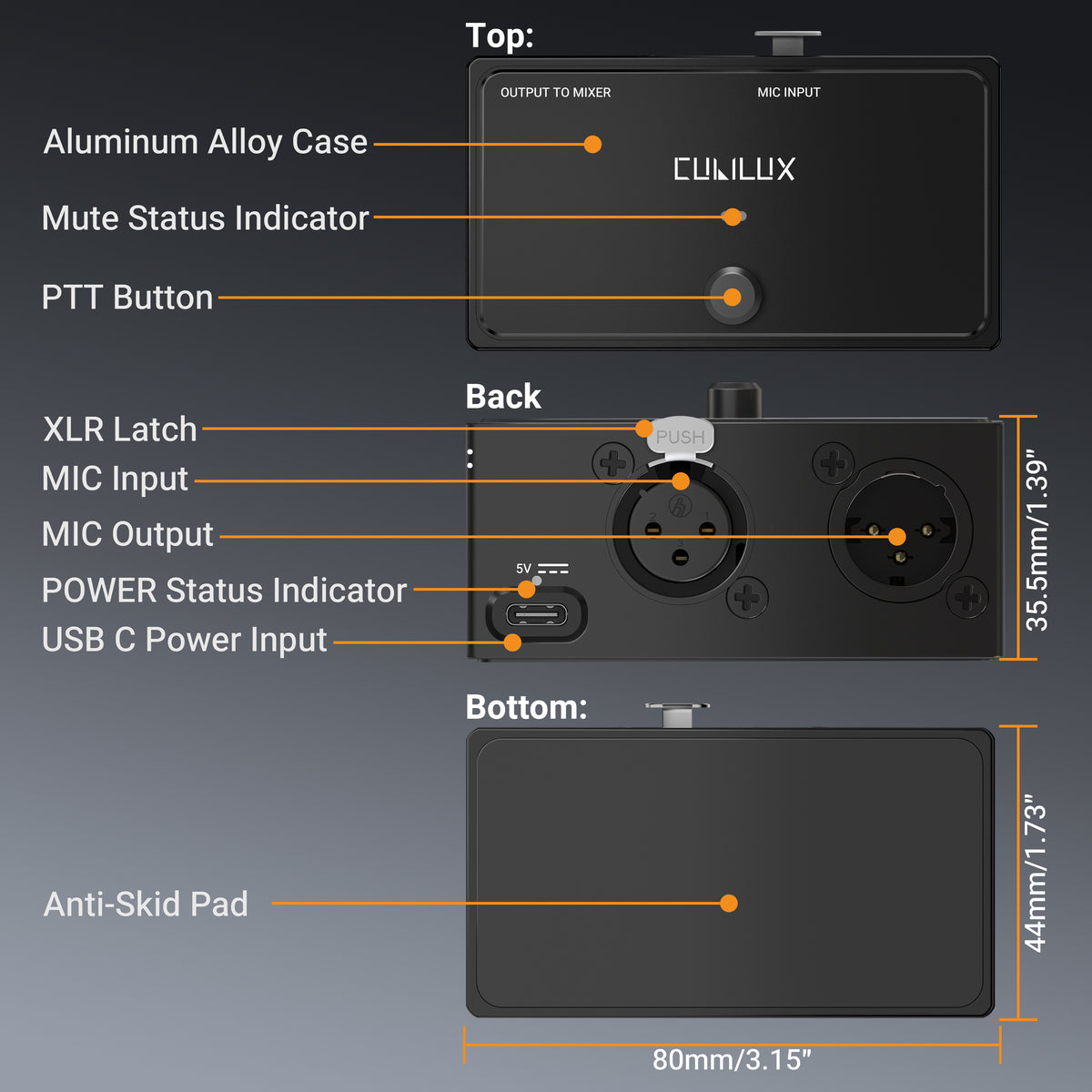
- 【USB Power Required & Dual LED Indicators】 – This device must be powered via USB to work correctly. Without USB power, the Push-to-Talk mute function will not operate. The power LED stays blue when powered, while the Push-to-Talk button LED lights green when pressed and turns off when released. A USB A to USB C power cable is included.
- 【48V Phantom Power Pass-Through】 – Allows 48V phantom power from a connected audio interface, mixer or preamp to pass through to a compatible condenser microphone. The switch itself does not generate or supply 48V phantom power.
- 【Aluminum Alloy Housing】 – Built with a durable aluminum-alloy enclosure and a responsive metal button for reliable daily operation. Its compact desktop design is ideal for podcasting, streaming, online meetings, gaming, teaching and live events.

Hold to Speak. Release to Mute.
Stay in control of your microphone during podcasts, live streams, meetings, and gaming. Press and hold the button to talk, then release it to mute by attenuating the microphone signal. The button LED glows green while pressed and turns off when released, giving you a clear visual cue as you speak.
This device must be powered via USB to work correctly.

USB Power Is Required for Push-to-Talk
Connect the included USB A to USB C cable to a USB power source. The power LED stays blue to confirm that the device is powered. Press and hold the Push-to-Talk button to speak—the button LED lights green while pressed and turns off when released.
Without USB power, neither LED will light up and the Push-to-Talk mute function will not operate, even when the XLR cables are connected.
This device must be powered via USB to work correctly.

Solid Build. Made for Everyday Use.
Built with a durable aluminum-alloy enclosure, this XLR Push-to-Talk switch combines a solid feel with a clean, professional look. The sturdy housing helps protect internal components during everyday use, from desktop recording to live events.
A responsive metal button puts microphone control at your fingertips, while the compact desktop design fits easily into podcasting, streaming, and meeting setups.

Secure Grip. Steady Control.
A silicone pad covers the entire base, providing grip that helps keep the switch steady on your desk. The non-slip surface reduces sliding as you press and hold the button, making Push-to-Talk control comfortable and convenient.
The soft silicone also helps protect your desktop from scratches, adding a practical layer of protection to your everyday setup.
Does this device require USB power?
This device must be powered via USB to work correctly. Use the included USB A to USB C cable. Without USB power, the Push-to-Talk mute function will not operate, even with XLR cables connected. 48V phantom power cannot replace USB power.
Does the button make a loud clicking sound?
The relay-based design produces only a very faint physical click during operation, helping minimize distracting button noise during recording, streaming, and meetings.
Can I use it with dynamic and condenser microphones?
Yes. It supports standard 3-pin XLR dynamic and condenser microphones. It passes 48V phantom power from your interface, mixer, or preamp to a compatible condenser mic. The switch itself does not generate phantom power. USB power is still required.
What do the blue and green LEDs mean?
The blue power LED stays on while USB power is connected. The green button LED lights up while you hold the Push-to-Talk button and turns off when released. Without USB power, neither LED will light up.
Do I need to keep holding the button to talk?
Yes. Press and hold to talk; release to mute by attenuating the microphone signal. This is a momentary, non-latching switch, so the button does not lock into the talk position.